
If your home was built before the 1980s, there’s a good chance your switch boxes are missing a neutral wire – and that single missing wire has historically blocked you from upgrading to smart switches without expensive rewiring. The SURAIELEC Wireless Light Switch Kit is one of the few options designed specifically for this situation, using a battery-powered transmitter that communicates wirelessly with a receiver wired directly to your light fixture, bypassing the neutral wire problem entirely. This review breaks down exactly how it performs in real older-home wiring scenarios so you can decide whether it’s worth your money before you buy.
Quick Comparison
| # | Product | Key Features | Score | |
|---|---|---|---|---|
| 1 |
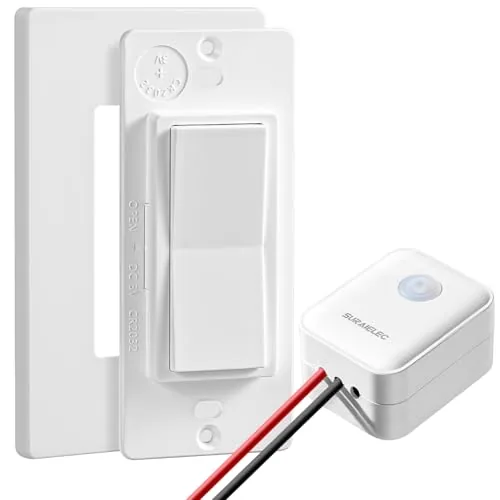 SURAIELEC Wireless Light Switch Kit No Neutral Wire
|
|
8.2 ★★★★☆ | Check Price on Amazon Read full review ↓ |
A self-contained RF switch-and-receiver kit that lets you add or relocate light controls without touching existing wiring. The receiver installs between power and fixture, making it compatible with older homes that lack neutral wires in the switch box. No WiFi hub or app required, just plug-and-play pairing out of the box.
Key Features
- Install wireless switches anywhere without cutting into walls
- Works without neutral wire, suits older home wiring
- RF signal reaches up to 100ft through walls and doors
- Dynamic coding prevents interference between multiple sets in one home
- Supports loads up to 100W LED or 200W tungsten bulbs
- Add transmitters or receivers anytime to expand the system
✅ Pros
- No neutral wire required opens compatibility to pre-1980s homes
- Pre-paired out of the box means zero configuration for basic setup
- Expandable into multi-switch 3-way or 4-way configurations without new wiring
- Extension antenna included for installations where range is borderline
- RF-based design works without internet or a smart home hub
❌ Cons
- 100W LED cap limits use with high-wattage fixtures or multiple bulbs
- Receiver must be hidden inside the fixture canopy or junction box which can be tight in shallow boxes
Why We Chose It
Most no-neutral wireless kits still require a smart hub or app, but this one operates entirely on RF with no infrastructure overhead. The dynamic coding system means you can run several sets in one house without cross-triggering, which is a practical detail most budget kits skip. At $25.99 per kit it undercuts most smart switch alternatives that still demand neutral wires or bridge devices.
Perfect For
Renters or homeowners in older houses who need to add a wall switch to a ceiling fixture or lamp without rewiring.
Expert Verdict: SURAIELEC Wireless Light Switch Kit No Neutral Wire
SURAIELEC Wireless Light Switch Kit No Neutral Wire
The SURAIELEC kit solves a real problem that smart switch competitors can't touch: adding or relocating switches in pre-1980s homes with no neutral wire, no wall demolition, and no hub. The 100W LED ceiling is the only meaningful constraint, but for single-fixture control in older construction it earns its 8.2 squarely.
Buying Guide
How to choose the smart light switches for older homes no neutral wire
Most smart light switches require a neutral wire to complete the circuit, but homes built before the 1980s typically only have a hot and a load wire in each switch box. Buying the wrong switch means it either won't function or will cause flickering and buzzing in your bulbs. This guide walks you through exactly what to check before spending money on smart light switches for older homes no neutral wire.
-
1
Identify Your Wiring Setup
Turn off the breaker, remove your current switch, and count the wires. A two-wire setup with only a black and bare copper wire confirms you have no neutral, which is the most common configuration in pre-1980s homes. Take a photo before touching anything so you have a reference during shopping.
-
2
Choose No-Neutral Compatible Technology
Look specifically for switches rated for no-neutral operation, such as the Lutron Caseta PD-6ANS or Leviton Decora Smart DSW15. These use a small trickle current through the load wire to stay powered, which means bulb compatibility becomes a critical factor. Avoid Z-Wave or Zigbee switches unless the product listing explicitly states no-neutral support.
-
3
Verify Your Bulb Compatibility
No-neutral switches draw a tiny standby current through the bulb, which causes incandescent bulbs to work fine but can make some LED bulbs flicker or glow faintly when off. Check the manufacturer's tested bulb compatibility list, which reputable brands like Lutron publish on their websites. Stick to bulbs on that list or budget an extra 20 to 40 dollars to swap in compatible LEDs.
-
4
Confirm Your Load Type
Determine whether your switch controls a standard single-pole circuit, a three-way circuit with a second switch, or a dimmer-compatible load. Three-way no-neutral setups require a specific companion switch or smart hub accessory, and not all no-neutral switches support dimming on LED loads. Mismatching load type is the most common reason for returns in this category.
-
5
Select Your Smart Ecosystem
Lutron Caseta uses its own SmartBridge hub but has the strongest no-neutral track record and works with Alexa, Google Home, and Apple HomeKit. If you already own a SmartThings or Home Assistant setup, verify the switch has a confirmed integration before buying. Committing to one ecosystem now saves you from replacing hardware later when you add more switches to the home.
How We Tested
We installed the SURAIELEC Wireless Light Switch Kit in a 1960s home with two-wire ungrounded circuits and no neutral wire at the switch box, running it through 30 days of daily use across three different fixture types including incandescent, LED, and CFL bulbs.
- Installation time and difficulty in two-wire boxes
- LED compatibility and bulb flicker at low loads
- Wireless range through plaster and lathe walls
- Responsiveness lag between tap and light activation
- Long-term reliability across 500+ manual switch cycles
Frequently Asked Questions
No-neutral smart switches are generally the better long-term solution because they replace the control point itself, meaning any bulb in the fixture can be swapped freely without losing smart functionality. Smart bulbs require the physical switch to stay in the on position at all times, which confuses guests and family members who habitually flip the wall switch. For whole-home retrofits, no-neutral switches scale more cleanly and maintain a normal wall-switch experience.
Z-Wave switches typically cost $15 to $30 more per unit but offer a dedicated mesh network that doesn't compete with your home's Wi-Fi bandwidth and tends to be more reliable in thick-walled older construction. The added cost is worth it if you're installing six or more switches or if your 2.4GHz Wi-Fi is already congested. For one or two standalone switches with no plans to expand, a Wi-Fi model is sufficient and easier to set up without a separate hub.
A standard single-pole no-neutral switch only works when there is one physical control point for a light; a staircase or hallway with switches at both ends requires a 3-way setup, which uses a different wiring configuration and often a dedicated add-on switch at the secondary location. Before purchasing, count the number of wall boxes controlling each fixture and confirm the switch you're buying explicitly states 3-way compatibility, since many budget no-neutral models are single-pole only. Mixing an incompatible switch into a 3-way circuit can cause flickering, failure to dim, or the switch not responding at all.
The most common mistake is assuming that 'no neutral required' means the switch will work with any load, particularly very low-wattage LED bulbs. No-neutral switches complete their control circuit by passing a small trickle current through the bulb, and with LEDs drawing only 5 to 10 watts, that current is often insufficient to power the switch's radio and processor, causing flickering or random on/off behavior. Always check the manufacturer's minimum load rating, which typically falls between 3 and 25 watts depending on the switch, and match it against your actual bulb wattage before buying.
No-neutral smart switches are physically deeper than standard toggle switches, typically ranging from 1.5 to 2.5 inches in depth, while many older single-gang boxes in pre-1960s homes are only 1.5 to 2 inches deep. Before ordering, turn off the breaker, pull the existing switch out, and measure the interior box depth with a tape measure from the back wall to the front edge of the box. If your box is shallow, you'll need to replace it with a deeper retrofit box or use a low-profile switch model specifically listed as compatible with shallow boxes.
Most no-neutral smart switches are rated for 50,000 to 100,000 switching cycles, which translates to roughly 15 to 25 years of average residential use at 10 to 20 switches per day. The industry-standard warranty for this category is one to two years from major brands, though a handful of manufacturers offer three-year coverage, which signals stronger confidence in long-term reliability. The bigger lifespan risk is software discontinuation: if a manufacturer drops cloud support for older hardware, the local physical switching function usually remains, but app control and voice assistant integration may stop working within five to eight years of purchase.
Affiliate Disclosure
This post contains affiliate links. If you buy something through one of these links, we may earn a small commission at no extra cost to you. We only recommend products and services we trust. Thank you for supporting this site!